
Best Hygrometer UK — Accurate Humidity Monitors for Damp and Mould
Last updated: 5 September 2026
Affiliate Disclosure: This page contains affiliate links. If you buy through these links, we may earn a small commission at no extra cost to you. See our Affiliate Disclaimer for more information.
The best hygrometer UK buyers need is not an expensive one — it is an accurate one, and the good news is that accuracy and price barely correlate in this category. A £8 ThermoPro will give you readings as reliable as a £40 unit for typical home monitoring.
If you own a dehumidifier and have never checked your actual humidity levels with a separate monitor, you are flying blind. Built-in dehumidifier displays are frequently several percentage points off. A standalone hygrometer tells you what the air in your home is actually doing — and that changes which settings you use, where you place your unit, and when you switch it off.
| ✅ Key Takeaways A hygrometer measures relative humidity (RH) — the percentage of moisture in the air. The healthy target for a UK home is 40–55% RH.Budget models (£8–12) are accurate enough for home monitoring. You do not need to spend more unless you want Bluetooth data logging.The ThermoPro TP49 is the best buy for most people — simple, accurate, cheap enough to put one in every room. The ThermoPro TP50 adds a backlight and min/max memory — worth the extra £2 for spotting overnight humidity spikes. The Govee Bluetooth Hygrometer is the upgrade pick — app alerts and 2-year data history make it ideal for problem rooms or unheated spaces. The GoveeLife WiFi 3-Pack is the best solution for monitoring multiple rooms simultaneously from one app. Note: ThermoPro has rebranded to TempPro on some Amazon listings — same product, same quality, different label. |
Why You Need a Hygrometer
Most UK homeowners dealing with damp, condensation, or mould already own a dehumidifier. Far fewer own a hygrometer — and that is a mistake, because without one you have no reliable way to know:
- Whether your humidity is actually in the healthy 40–55% range or still dangerously high
- Whether your dehumidifier is set correctly — built-in displays are often 3–8% off actual readings
- Which rooms have the worst humidity and therefore need the most attention
- When the problem is solved and you can reduce how hard your dehumidifier is running
At £8–12 per unit, there is no practical argument against having one in every room with a damp problem. A single hygrometer gives you more actionable information than any amount of guesswork.
| ⚠ Do not trust your dehumidifier’s built-in displayThe humidity display built into most dehumidifiers — including well-regarded models — measures air that has already passed through the machine rather than the ambient air in the room. This means readings are frequently 3–8 percentage points lower than actual room humidity. A dehumidifier showing 52% RH may be sitting in a room at 58% RH. A standalone hygrometer placed at head height in the centre of the room gives you the accurate reading. Use the dehumidifier display to monitor trends; use the hygrometer for accurate absolute readings. |
What to Look For
- Accuracy: ±2–3% RH is the standard for budget models — perfectly acceptable for home monitoring. Laboratory-grade accuracy (±1%) costs £40+ and is unnecessary for domestic use.
- Refresh rate: Every 10 seconds is the standard on quality budget units. Slower refresh rates (30–60 seconds) make it harder to track rapid humidity changes during cooking or showering.
- Min/max memory: Records the highest and lowest readings since last reset. Invaluable for spotting overnight condensation spikes when you are asleep — you can check in the morning what the humidity reached at its worst.
- Display size and backlight: Matters if the unit is in a dimly lit cellar, garage, or bedroom. The TP49 has no backlight; the TP50 does.
- Bluetooth or WiFi: Useful for unheated or inaccessible spaces (loft, garage, cellar) where you would not check manually. App alerts notify you when humidity crosses a threshold — so you know to investigate without having to physically visit the room.
- Mounting options: Most units can stand on a shelf, wall-mount with a nail, or stick to a metal surface magnetically. The TP50’s magnetic back is useful in kitchens and utility rooms.
Quick Comparison
| Model | Accuracy | Backlight | Min/max | Bluetooth | Best for |
| ThermoPro TP49 | ±2–3% | No | No | No | Budget pick, multi-room |
| ThermoPro TP50 | ±2–3% | Yes | Yes | No | Best overall |
| Govee Bluetooth | ±3% | Yes | Yes | Yes | Remote monitoring |
| GoveeLife WiFi 3-Pack | ±3% | Yes | Yes | WiFi | Whole-home monitoring |
The Reviews
1. ThermoPro TP49 — Best Budget Pick
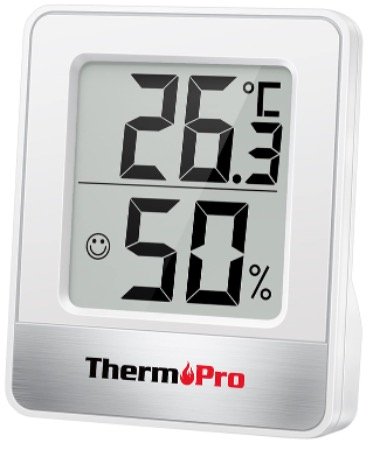
The ThermoPro TP49 is the starting point for most buyers and it is hard to argue against it at this price. Clear LCD display, ±2–3% accuracy, 10-second refresh rate, and a compact footprint that fits on any shelf or windowsill. It runs on a single AAA battery that lasts around 12 months.
The one meaningful limitation is the lack of min/max memory — the display shows current readings only. If overnight condensation is your concern and you want to see what humidity the room reached at 3am, step up to the TP50. For general daytime monitoring of occupied rooms, the TP49 does everything you need.
| ✅ Pros | ❌ Cons |
| ✔ Genuinely accurate for the price — ±2–3% RH✔ 10-second refresh rate✔ Compact — fits anywhere✔ 12-month battery life on a single AAA✔ Cheap enough to buy one per room | ✗ No min/max memory✗ No backlight — harder to read in low light✗ No Bluetooth or app connectivity |
| 🔵 VerdictThe ThermoPro TP49 is the right answer if you just want to know what the humidity is in a room right now. Buy two or three and put one in every problem room. At this price, there is no reason not to. |
2. ThermoPro TP50 — Best Overall
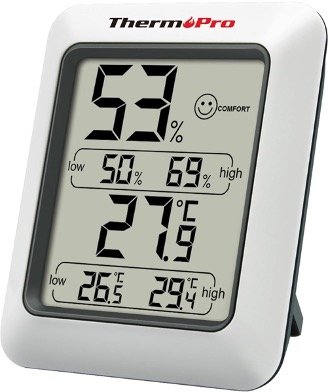
The ThermoPro TP50 adds two features that make a real practical difference over the TP49: a backlight for low-light reading and min/max memory that records the highest and lowest humidity readings since the last reset. For most buyers dealing with damp or condensation, this is the one to get.
The min/max feature is particularly valuable in UK homes. Condensation problems are worst overnight when temperatures drop — the peak humidity often occurs at 3–4am when nobody is awake to check. Reset the min/max each morning and you get a clear record of what the room’s humidity reached overnight. If it is hitting 70%+ while your dehumidifier reads 55%, you know the dehumidifier display is inaccurate and the unit needs to work harder.
The magnetic back is a small but genuinely useful addition — sticks to the side of a radiator, fridge, boiler, or any steel surface without needing a nail or stand.
| ✅ Pros | ❌ Cons |
| ✔ Min/max memory — catches overnight humidity spikes✔ Backlight for dimly lit spaces✔ Magnetic back — sticks to steel surfaces✔ Same ±2–3% accuracy as TP49✔ Only marginally more expensive than the TP49 | ✗ Still no Bluetooth or app connectivity✗ Slightly larger than the TP49 |
| 🔵 VerdictThe ThermoPro TP50 is the one we would recommend to most UK buyers. The min/max memory alone makes it worth the extra over the TP49 — it turns a passive display into a genuine diagnostic tool for spotting when and how severely your home’s humidity spikes. |
3. Govee Bluetooth Hygrometer — Best for Remote Monitoring
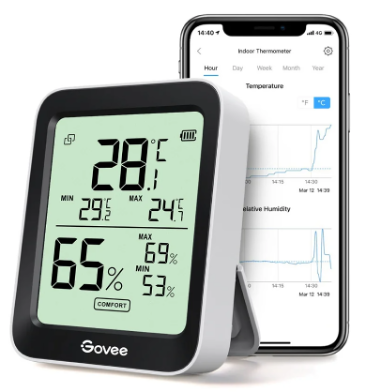
The Govee Bluetooth Hygrometer is the upgrade for buyers who want more than a display — it connects to the Govee Home app via Bluetooth (164 ft / 50 m range) and logs 2 years of temperature and humidity data in the app. You can set custom alerts so your phone notifies you the moment humidity crosses a threshold you define.
The practical use case for UK homes is unheated or semi-accessible spaces — a garage, cellar, loft, or caravan — where you would not physically check a display regularly. Instead of walking down to check, you open the app. If the garage has hit 75% RH overnight, you get an alert and know to run a desiccant dehumidifier before mould takes hold.
The data logging is also useful if you are troubleshooting a persistent damp problem and need to identify patterns — does humidity spike every evening when the household is cooking? Every weekend? When it rains? The app charts make this visible.
| ✅ Pros | ❌ Cons |
| ✔ App alerts when humidity exceeds your threshold✔ 2 years of data history in the app✔ 164 ft Bluetooth range — covers most garages and cellars✔ Ideal for unheated or hard-to-access spaces | ✗ Requires phone nearby for Bluetooth sync✗ More expensive than the ThermoPro models✗ Relies on Govee app — requires account creation |
| 🔵 VerdictThe Govee Bluetooth Hygrometer is the right choice if you have a problem space you cannot check daily — a garage, cellar, or caravan — or if you want to actually understand your home’s humidity patterns over time rather than just check a reading occasionally. The alert feature alone is worth the step up from the ThermoPro models for many buyers. |
4. GoveeLife WiFi Hygrometer 3-Pack — Best for Whole-Home Monitoring
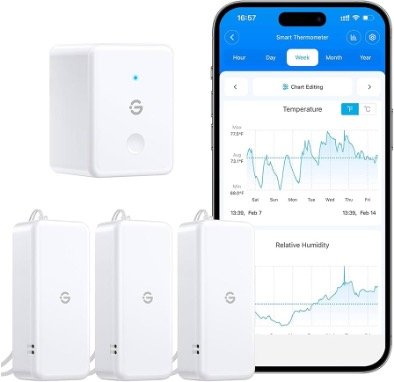
The GoveeLife WiFi 3-Pack solves the multi-room monitoring problem in one purchase. Three sensors connect via WiFi (not just Bluetooth, so they work at any range within your home network) and all report back to the same app. You can see bedroom, living room, and cellar readings simultaneously without moving anything.
The WiFi connection is the key upgrade over the standard Govee Bluetooth model — Bluetooth requires your phone to be within range of each sensor to sync. WiFi sensors push data continuously to the cloud and you can check from anywhere, including away from home.
For a household managing damp across multiple rooms, or anyone who wants a whole-home picture before deciding where to focus dehumidifier effort, this is the most practical solution available at the price.
| ✅ Pros | ❌ Cons |
| ✔ Three sensors in one purchase✔ WiFi — works at any range, monitor from anywhere✔ All rooms visible in one app simultaneously✔ App alerts per sensor — customise thresholds per room✔ Good value per sensor compared to buying individually | ✗ Requires WiFi setup per sensor✗ Higher upfront cost than single units✗ Relies on Govee cloud — data access requires account |
| 🔵 VerdictThe GoveeLife WiFi 3-Pack is the best option for anyone managing humidity across multiple rooms. Three sensors, one app, full-range WiFi monitoring — it gives you a complete picture of your home’s humidity without having to walk around checking individual displays. |
How to Use a Hygrometer Properly
Where to place it
- Centre of the room at head height (1–1.5 m) — not on a windowsill or external wall where localised cold spots skew readings.
- Away from heat sources — radiators, direct sunlight, and appliances will give falsely low humidity readings immediately around them.
- Away from the dehumidifier intake — the unit draws in room air and exhausts drier air; readings near the exhaust will be artificially low.
- In the problem area — if you are concerned about a cellar or garage, put it there. A reading in the hallway tells you nothing about the cellar.
What the readings mean
| Reading | What it means | What to do |
| Below 40% RH | Too dry — air can irritate airways and dry skin | Reduce dehumidifier output or raise target RH |
| 40–55% RH | Ideal range — healthy and comfortable | Maintain — no action needed |
| 55–60% RH | Slightly elevated — acceptable short-term | Monitor — run dehumidifier if persistent |
| 60–70% RH | High — dust mites thrive, condensation risk | Run dehumidifier, improve ventilation |
| Above 70% RH | Danger zone — mould growth likely within days | Immediate action — sustained dehumidifier use |
Frequently Asked Questions
What is a normal humidity level for a UK home?
40–55% RH is the healthy target for a typical UK home. Below 40% and the air becomes too dry; above 60% and dust mites thrive and mould risk increases. Most UK homes without active humidity management sit between 55–75% RH in autumn and winter, which is why dehumidifiers are so widely used here.
How accurate are cheap hygrometers?
Accurate enough for home monitoring. Budget models like the ThermoPro TP49 and TP50 are rated at ±2–3% RH — meaning a reading of 55% could be anywhere between 52% and 58% in reality. For deciding whether to run your dehumidifier or adjusting its settings, this is more than sufficient. For laboratory or professional use you would need ±1% accuracy, which costs significantly more.
Do I need a hygrometer if my dehumidifier has a display?
Yes — for the reasons covered above. Dehumidifier displays measure air passing through the machine rather than ambient room air, and frequently read 3–8 percentage points lower than actual room humidity. A standalone hygrometer placed at head height in the centre of the room gives you the accurate reading. Use them together: the dehumidifier display for relative trends, the standalone hygrometer for accurate absolute readings.
Can I use a hygrometer in a garage or cellar?
Yes — and for cold, unheated spaces like garages and cellars, the Govee Bluetooth Hygrometer or GoveeLife WiFi 3-Pack are the better choices over basic display models, because they alert you when humidity crosses a dangerous threshold without you having to check manually. Unheated UK spaces can hit 80%+ in winter — catching this early prevents serious mould and structural damage.
What humidity level causes mould in a UK home?
Mould growth becomes likely when relative humidity exceeds 70% for sustained periods, and can begin within 24–48 hours at 80%+ RH. Surface mould on walls typically requires the surface temperature to also be below the dew point, which is why north-facing walls and cold corners are most vulnerable. Keeping room humidity below 55% RH eliminates the conditions mould requires.
ThermoPro or TempPro — are they the same thing?
Yes. ThermoPro rebranded to TempPro on Amazon listings in 2024. The TP49 and TP50 are identical products — same sensors, same accuracy, same build quality — just listed under the new brand name on some Amazon pages. Both names refer to the same units.
Related Articles
| Keep Reading Should You Leave a Dehumidifier on Overnight? — how to use your hygrometer readings to set the right dehumidifier schedule. Desiccant vs Compressor Dehumidifier UK — choosing the right type once your hygrometer has confirmed you have a humidity problem. Best Dehumidifier for Mould UK — if your hygrometer is showing readings above 65% RH consistently. Condensation on Windows Every Morning — understanding what your hygrometer readings mean for condensation risk. Do Dehumidifiers Use a Lot of Electricity? — running costs at 24p/kWh for every major model. |
| Sources & About This Page Accuracy specifications sourced from ThermoPro and Govee manufacturer data. Healthy humidity range referenced from NHS and WHO indoor air quality guidance. Mould risk thresholds referenced from HHSRS (Housing Health and Safety Rating System) guidance. This article was written by the ukairquality.co.uk editorial team and reviewed for accuracy before publication. |

2 Comments